

Your Towne24 Migration Checklist
Tips & Timelines
Below are important actions to take after your migration to Towne24. If you have any questions along the way, Treasury Member Care is here to help.
After Moving to Towne24
Login Experience Updates

Credentials
Our Towne Member Care Team will email you detailed instructions the day you are able to log into Towne24.

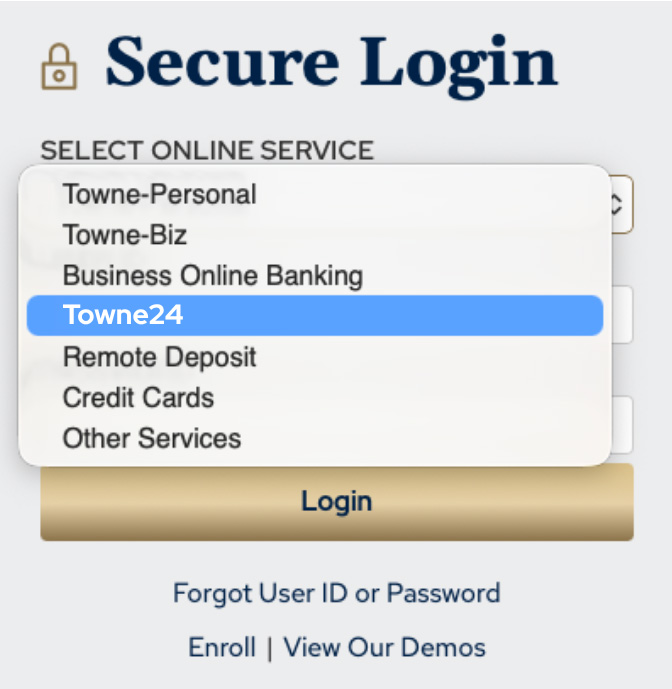
Updated Login Dropdown Options
If you use the login box on TowneBank.com, you will now need to select "Towne24" from the dropdown options.

Towne24 Mobile Banking App
Be sure to download the Towne24 Mobile Banking app from the Apple App Store or Google Play.
Transactional Review
Templates
- Templates that had the same names in Business Online Banking were transferred to Towne24 with numbers after the template names.
- Example, if your organization had three templates with the name “Payroll” those transferred to Towne24 with the names Payroll 1, Payroll 2, Payroll 3.
- Templates that had special characters in the names transferred to Towne24 without those characters.
- Example, if your organization had a template named Template #1, it transferred to Towne24 as Template 1.
- Users who have access to a payment service will be able to see that service's payment templates and, if their permissions allow, can use those templates to process payments until Admins make modifications to user access.
Transactions
- If you joined TowneBank from a recent bank transition, your history will be available back to June 9, 2025.
Bill Pay
- Admins will need to link sub-user's profiles to the bill pay service and establish user permissions.
- We recommend reviewing your scheduled payments and payees to ensure accuracy.
Positive Pay
- If your users had different Positive Pay permission levels across accounts in Business Online Banking, their access in Towne24 will be based on their highest permission level. This highest level of access will be applied to all eligible accounts.
- ACH Positive Pay decisions are needed by 2:00 PM daily.
- ACH Positive Pay transactions will appear in your account until decisions are made.
Paperless Statements
Admins will need to re-enroll in paperless statements. To do this, select Settings & Alerts from the main menu. Then, select Statement Delivery. From here, you can change edit your delivery type and provide the preferred email address.
Important: Enhancements to Multiple Transfers in Towne24 Business Banking
We encourage businesses that regularly use multiple transfers to review their reconciliation procedures and discuss any questions with your Treasury Management Advisor.
| In Business Online Banking | In Towne24 | What This Means for You |
|---|---|---|
| When you used to transfer funds from multiple accounts into a single account, you would see one combined deposit in the receiving account. | In Towne24 Business Banking, each transfer will post separately. While the total dollars transferred will not change, you will see more transaction entries on your accounts. |
|
We're Here to Help!
If you need support at any point, help is just a call away with Treasury Member Care at 844-638-6724 (M-F 8:30 AM - 6 PM) or you can submit the contact form below.
Your mobile carrier’s web access and text messaging charges may apply. Availability may be affected by your mobile carrier's coverage area.
Apple is a service mark of Apple Inc.
Android is a registered trademark of Google LLC.