

Remote Deposit Capture
Starting February 9, the TowneBank Remote Deposit Capture system will be the only remote deposit option for your business checks. By now, you should have had an appointment with our partners at Benchmark Technologies to install the necessary software and drivers so you can begin using the system. If you have not yet had an appointment, please contact Treasury Member Care at 844-638-6724, M-F, 8:30 AM - 6:00 PM.
Please note that if you have not yet installed the TowneBank software, you will need to visit a local TowneBank office to deposit checks.

Logging In on February 9
You will access Remote Deposit Capture as you always have, through Online Banking. Select the Login button in the top, right-hand corner, select 'Old Point Online' from the drop down menu. You can log in with your existing username and password.
Scanning Your First Checks
You will need to run the TowneBank WebScan application Benchmark Technologies installed during your appointment before scanning checks.
- Go to your desktop and locate the WebScan icon, double click it to run the application.

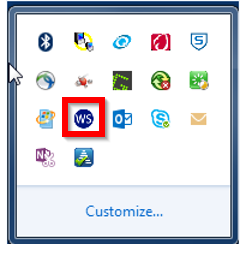
- You should see WebScan running in your system tray. If so, you're ready to start using the system.
Need Help? Please contact our Treasury Member Care team at 844-638-6724, M-F, 8:30 AM - 6:00 PM if you require any assistance.
TowneBank Remote Deposit System Benefits
Extra time to make deposits, robust reporting, the ability to submit an unlimited number of deposits, and more!


Frequently Asked Questions
-
You will need to run the TowneBank Webscan application Benchmark Technologies installed during your appointment to begin scanning checks. Use the instructions below to get started.
- Go to your desktop and locate the WebScan icon, double-click on the icon to run the application.
- You should now see the WebScan application running in your system tray.
- Go to your desktop and locate the WebScan icon, double-click on the icon to run the application.
-
If you did not make an appointment prior to February 9 to update your workstation’s software, you will need to visit a TowneBank location to deposit checks. To update your software, please contact our Treasury Member Care team at 844-638-6724, M-F, 8:30 AM - 6:00 PM.
-
You will need to contact your Remote Deposit Administrator to modify your entitlements.
-
No, you will log into Old Point Online to access Remote Deposit Capture. You will be able to log in using the same username and password you used at Old Point.
*Your mobile carrier's web access and text messaging charges may apply. Availability may be affected by your mobile carrier's coverage area. Mobile check deposit is subject to eligibility and further review. Deposits are subject to verification and not available for immediate withdrawal. Deposit limits and other restrictions apply.