

Personal Online Banking Transition
On February 9, all Old Point systems transitioned to TowneBank. You will now access a refreshed version of the same online banking system you previously used at Old Point with the same username and password.
After logging in for the first time, you may be prompted to re-enroll in certain services so they can be connected to your TowneBank account. Additional details are provided below. Later in 2026, this online banking platform will undergo an additional upgrade to deliver an enhanced TowneBank digital banking experience.
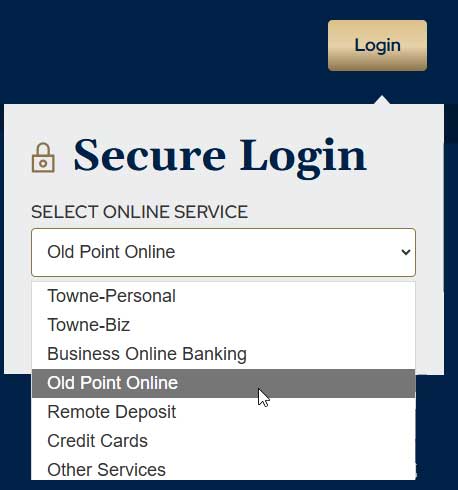
Logging In
Select the Login button from the top, right-hand corner on TowneBank.com and select Old Point Online from the drop-down list of options. You can use the same username and password you used at Old Point. After you log in, you will be prompted to accept the updated online banking agreement.
Bill Pay
- We expect all previously scheduled payments to continue as usual, without interruption. We do encourage you to confirm your eBills are correctly listed in Old Point Online.
- If you had any bill payments scheduled between February 6-8, please review those payments to ensure they processed as expected.
Wire Transfers
Please note that as of February 9, 2026, personal online banking users will no longer be able to initiate wire transfers through online banking. Please contact your banker to initiate a wire.
Members with Online Banking at both TowneBank and Old Point
Personal online banking users at both Old Point and TowneBank will continue to log in to separate applications to see account activity since services, such as bill pay, are unique to each system. However, if you'd like to discuss a combined online experience, reach out to Towne Member Care at 844-638-6714, M-F, 8:30 AM - 6:00 PM, or talk with your banker.

Zelle®**
If you used Zelle at Old Point, you will need to re-enroll in the service so your TowneBank account is linked to your email or phone number. We remind you to only use Zelle® to exchange money with people you know and trust.

Old Point by TowneBank Mobile Banking App^
Your mobile application should have automatically updated to Old Point by TowneBank.
Please be prepared to log in for the first time with your username and password. Once you log in, you will be able to set up biometric login if that is your preferred method.
Important Note for Card Control Users
If you used Card Controls in the Old Point app, this service will be unavailable. Please be on the lookout for a new service coming to you in 2026.
Quicken® or Quickbooks®
Follow these instructions after February 9 to reconnect your accounts to Quicken or Quickbooks.

- PERSONAL ONLINE BANKING USERS CAN SET UP “ME-TO-ME” TRANSFERS between your accounts at TowneBank and other financial institutions at no charge. If you already had scheduled transfers in place, please ensure that they look correct after your initial login.
- TRAVEL NOTIFICATIONS for personal accounts are available by sending a message through our secure chat feature or calling Towne Member Care at 844-638-6714 to advise us of your travel plans.
Debit card controls currently available through Old Point online banking will end on Friday, February 6, 2026. For debit card support, please call Towne Member Care at 844-638-6714, M-F, 8:30 AM – 6:00 PM and 866-952-5651 after hours and on weekends. TowneBank will communicate about a separate service to monitor and control debit card activity later in 2026.
Please note that English is the available language option for online banking services at TowneBank.
If you prefer e-statements, it will be necessary to accept the TowneBank electronic disclosure agreement and elect to have your statements delivered electronically. Until you elect electronic statement delivery, you will receive a paper statement.
Please know we will provide ongoing information regarding your online services by sending updates through emails, online banking, and other types of messaging before, during, and after the weekend of February 6-8.
Need Support?
If you have questions or need personal assistance, please contact Towne Member Care at 844-638-6714, M-F, 8:30 AM - 6:00 PM.
Frequently Asked Questions
-
Please note that as of February 9, 2026, personal online banking users will no longer be able to initiate wire transfers through online banking. Please contact your banker to initiate a wire.
-
If you prefer e-statements, it will be necessary to accept the TowneBank electronic disclosure agreement and elect to have your statements delivered electronically. Until you elect electronic statement delivery, you will receive a paper statement.
-
We expect all previously scheduled payments to continue as usual, without interruption. You may continue to add new payees or payments through Bill Pay, both pre- and post-conversion.
-
Personal online banking users at both Old Point and TowneBank will continue to log into separate applications to see account activity since services, such as bill pay, are unique to each system. However, if you'd like to discuss a combined online experience, reach out to Towne Member Care at 844-638-6714, M-F, 8:30 AM to 6:00 PM, or speak with your banker.
-
If you need help with online or mobile banking, please contact Towne Member Care at 844-638-6714, M-F, 8:30 AM - 6:00 PM. If you have account related questions, please contact your banker.
-
Your username and password remained the same. Your mobile application will automatically update if that feature is enabled on your device; otherwise, you will need to download the newest version available on February 9, 2026. To log in, select the log in button in the top, right-hand corner of TowneBank.com and select Old Point Online from the drop-down menu.
-
Your mobile application should have automatically updated if that feature is enabled on your device; otherwise, you will need to download the newest version available on February 9, 2026. Go to your favorite app store and search for Old Point by TowneBank.
-
Zelle® is available for personal online banking users to send or receive money safely and quickly. It will be necessary to re-enroll in Zelle® on or after Monday, February 9, 2026, to connect this service to your TowneBank account. We remind you only to use Zelle® to exchange money with people you know and trust.
Your mobile carrier's web access and text messaging charges may apply. Availability may be affected by your mobile carrier's coverage area.
**Zelle and the Zelle related marks are wholly owned by Early Warning Services, LLC and are used herein under license. In order to send payment requests or split payment requests to a U.S. mobile number, the mobile number must already be enrolled with Zelle. U.S. checking or savings account required to use Zelle®. For your protection, Zelle® should only be used to send money to friends, family, and other people or businesses you trust. Payments made with Zelle® are like sending cash and may not be able to be recovered. Transactions between enrolled consumers typically occur in minutes.
^App Store is a service mark of Apple Inc. Certain devices are eligible to enable fingerprint sign-on. If you store multiple fingerprints on your device, including those of additional persons, those persons will also be able to access your TowneBank Mobile Banking app via fingerprint when fingerprint is enabled. App Store is a service mark of Apple Inc. Touch ID and Face ID are registered trademarks of Apple Inc. Only select Apple devices are eligible to enable Face ID. If you have family members who look like you, we recommend you log into mobile banking with your username and password. Google Play and the Google logo are trademarks of Google Inc.